Wednesday, October 21, 2026
Turn Off ACR: Samsung vs LG, One Is Easier
- Published
- 11:46 AM
- Author
- Comments
- 0
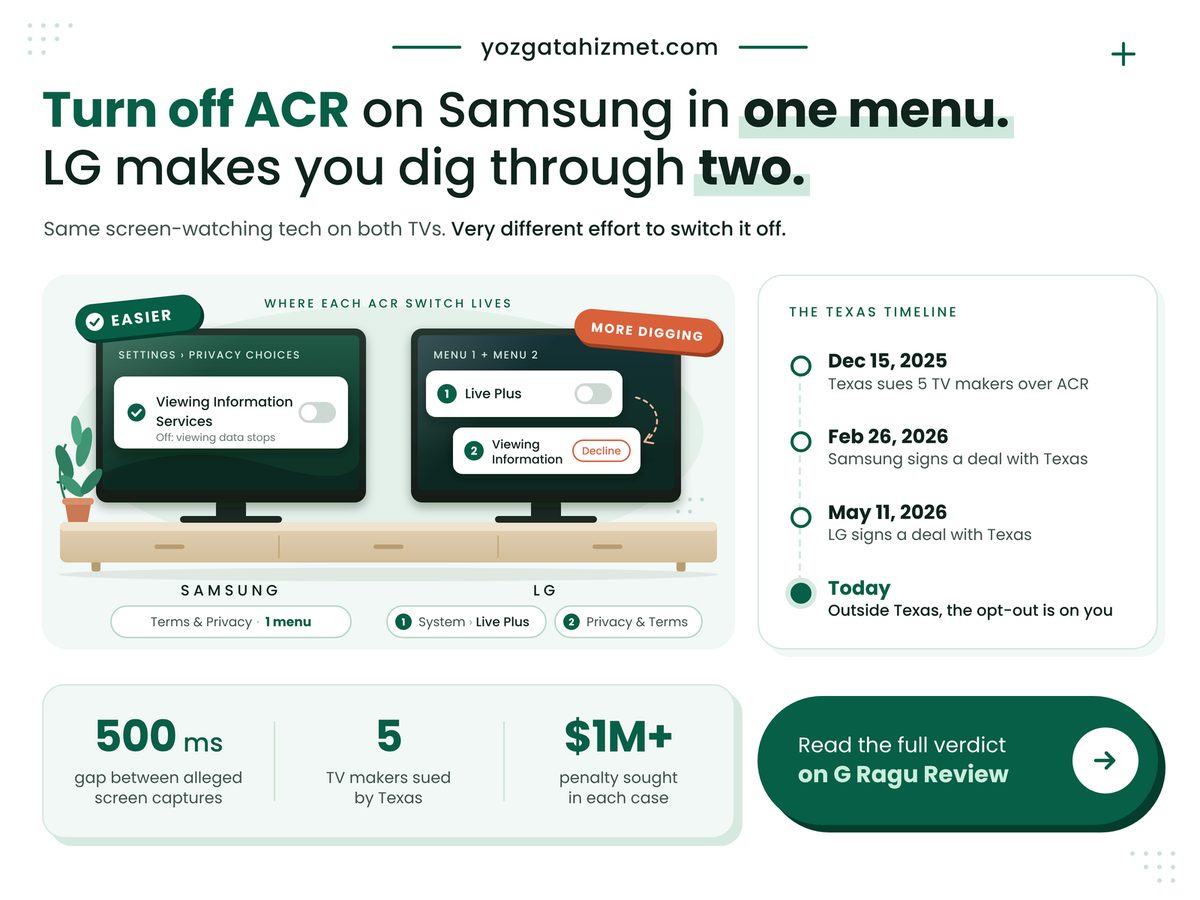
Samsung or LG: if you want to turn off ACR, the set that keeps it behind a single switch is the Samsung, and that is the answer this piece defends. ACR, automatic content recognition, is the feature that identifies what is on your screen and reports it back. Both brands ship it. Both were sued over it in Texas. But on a Samsung you hunt for one setting, while LG spreads the same job across two different menus with two different names.
Key Takeaways
Samsung is the easier opt-out: one setting, Viewing Information Services, stops its ACR, while LG spreads the same job across two menus.
- On an LG, switch off Live Plus and decline the Viewing Information agreement under User Agreements; the two sit in different places.
- Texas's lawsuits allege ACR also reads what plays through HDMI, so a console or cable box does not shield you.
- Both makers' 2026 Texas agreements require consent from Texans; as announced, neither covers buyers in other states.
Is my smart TV taking screenshots of what I watch?
Yes, if ACR is switched on, according to the Texas Attorney General, whose December 15, 2025 release says the software can capture screenshots of a user's television display every 500 milliseconds. That is two frames a second. Do the sum: multiply the hourly figure in the grid below by the hours your TV is on tonight. A three-hour evening comes to 21,600 possible captures.
The old advice to use the TV as a dumb screen for a console is out of date. CyberInsider's December 19, 2025 summary of the complaints says the makers also collected data from HDMI-connected devices, game consoles and cable boxes among them. Never opening the built-in apps protects nothing. Our explainer on how smart TVs track what you watch with ACR covers the matching, and that profile feeds the advertising in your new smart TV sells ads before you watch anything.
Four numbers frame the legal side, and none lets either brand off the hook. The Attorney General's December release named Sony, Samsung, LG, Hisense and TCL. CyberInsider reported that the state seeks civil penalties in each case under the Texas Deceptive Trade Practices Act. Hoodline reported on January 7, 2026 that a Collin County order barring Samsung from using Texans' ACR data was vacated almost at once. The hourly count is our own arithmetic, not a filing's.
TV Makers Texas Sued
5
Samsung and LG both named
Penalty Sought per Case
$1M+
At stake for every brand
Life of Samsung's Court Order
1 day
No ruling shields your TV
Snapshots per Hour, Alleged
7,200
Derived; multiply by your nightly hours
The court order is the part people misremember. It was set aside, and a fresh application was denied on January 9. What changed Samsung's practice was an agreement, announced on February 26, 2026, requiring Texas consumers' express consent before any ACR collection.
A court order that lasted a day is not a privacy setting. The switch in your own menu is the only protection that stays on.
How do I turn off ACR on a Samsung or LG TV?
On a Samsung, open Settings, then Support, Terms & Privacy and Privacy Choices, and switch off Viewing Information Services; on an LG, switch off Live Plus and decline the viewing agreement under User Agreements. The paths come from Malwarebytes' March 2, 2026 guide and Tom's Guide's January 30, 2026 walkthrough, which warn that names shift by model year. Samsung's own support page says only that ACR can be switched off in Settings at any time.
LG's second stop is official. Its support library, in a page dated September 2026, sends owners to Settings, Privacy & Terms, User Agreements, where optional agreements cover what you watch, voice features and personalised ads. Live Plus sits elsewhere, under Additional Settings. So that is two switches. Well, one switch and one agreement, which look nothing alike. LG's updated terms took effect on August 28, 2026; if your set asked you to accept something since, that screen was the consent.
Read the table by row; each answers a question you would ask with the remote in hand.
| What differs | Samsung vs LG | What it means for you |
|---|---|---|
| 💰 Effort | Samsung 1 switch, 1 menu LG 2 switches, 2 menus |
✅ Half the hunt |
| 🔒 Setting name | Samsung Viewing Information Services LG Live Plus, Viewing Information |
⚠️ Search both names |
| ⚖️ Texas deal | Samsung Feb 26, 2026 LG May 11, 2026 |
✅ Texans get consent screens |
| 🧾 New terms | Samsung After updates LG Since Aug 28, 2026 |
⚠️ Reread new prompts |
| 🌍 Outside Texas | Samsung Not stated LG Not stated |
❌ Opt out yourself |
| 🏁 Best suited for | Samsung One stop LG Two-menu patience |
🏁 Patience decides |
If you read one row, read the fifth: a buyer in Ohio or California should assume nothing changed. Whether the Texas consent screens quietly spread nationwide is the open question. Our guess is that a maker would rather ship one firmware than fifty, but a guess is not a setting.
Both brands now owe Texans a consent screen, yet neither agreement, as announced, says it reaches a TV anywhere else, so outside Texas the switch is still yours to flip. Dates come from the Texas Attorney General's releases and LG's support page; the day counts between them are our own arithmetic.
Where both opt-outs still fall short
Both opt-outs still depend on you finding a setting whose name and location change between model years, and neither Texas agreement, as announced, protects a buyer in another state. The settlements make LG's split menu harder to excuse. The Attorney General's May 11, 2026 release says LG must give users a clear and simple way to opt out. Two menus under two names is not simple.
Samsung is not spotless either: older menus differ from recent sets. And ACR is only one way a TV profiles you; the home screen is itself an ad slot, which is why we compared which home screen shows you fewer ads, Roku or Google TV.
- Switching ACR off does not remove home-screen ads; it changes what they can be based on.
- LG's support page says its terms-update notice cannot be disabled and stops only once you respond, so answer it deliberately.
- Clicking agree at setup is the consent the makers rely on, and you can withdraw it in Settings whenever you like.
Check these against your own set
- You can find Live Plus anywhere in Settings: do both LG stops, not one.
- Anything plugs into an HDMI port: switch ACR off even if you never open an app.
- Your address is outside Texas: no announced agreement changes your defaults.
- You accepted new terms since late August: reopen User Agreements and read what you ticked.
Samsung is the easier opt-out: one setting, one menu, done. LG can be just as quiet, but only if you make both stops every time it asks you to agree to something new. This week, before your next evening of television, open Settings and switch the viewing-data setting off.
No comments
Post a Comment