Wednesday, October 21, 2026

TV Antenna vs YouTube TV: What $83 Buys You

Published
Author
Comments
0

Every month the same charge lands for a household that mostly watches local news, Sunday football and whatever Netflix suggests next. Two ways to get those local channels compete for that money: an antenna stuck to a window, or YouTube TV streaming them. Framed as TV antenna vs YouTube TV, it sounds like a gadget question. It is really about what the bill buys that the air hands out free.
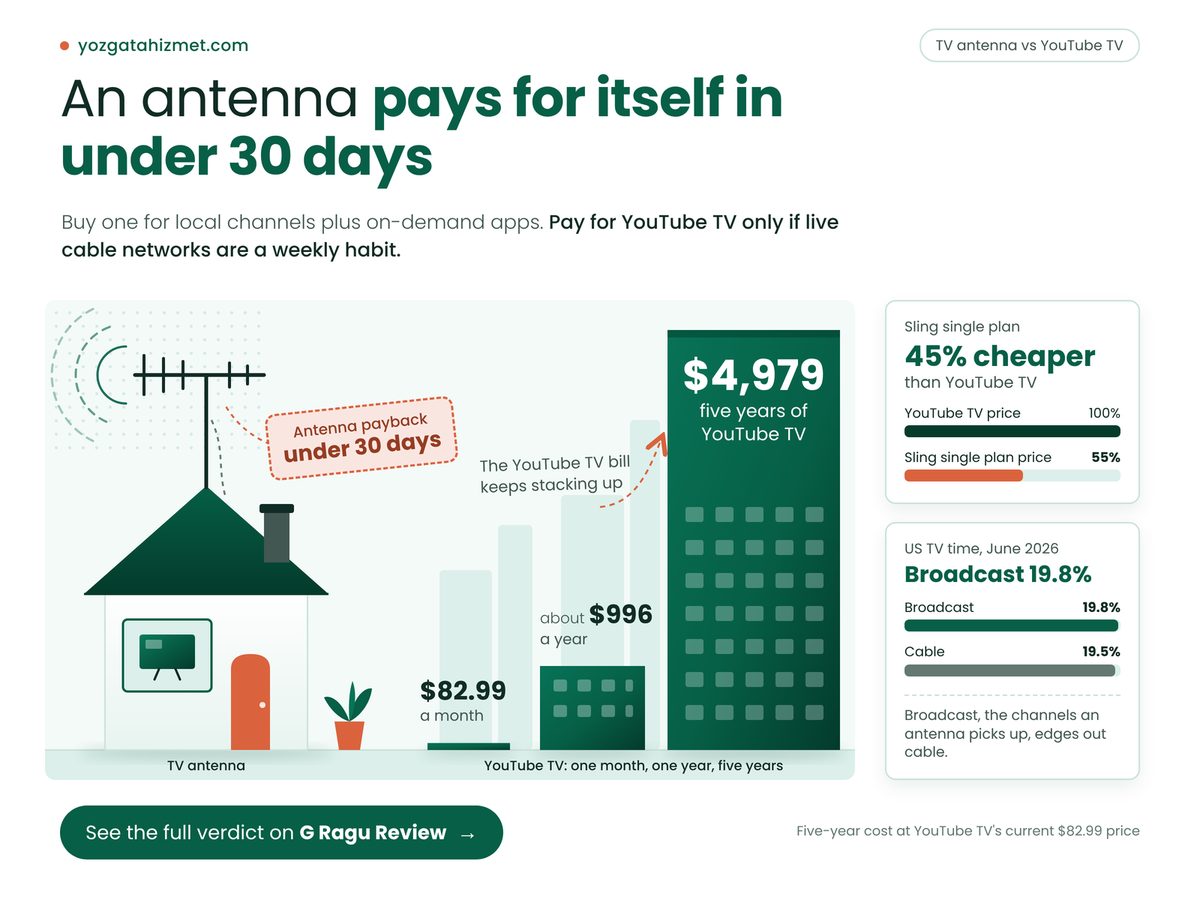
TV antenna vs YouTube TV: house antenna beside towers showing $82.99, $996, $4,979 costs

Key Takeaways

Buy an antenna for local channels plus on-demand apps; pay for YouTube TV only if live cable networks are a weekly habit.

  • A year of YouTube TV costs about $996, while an antenna's locals cost nothing after purchase.
  • Sling's cheaper plans mostly skip ABC and CBS, so they need an antenna too.
  • Nielsen's June 2026 count put free broadcast TV ahead of all cable in US viewing time.
  • Check the FCC's DTV Reception Maps first: reception, not price, is the antenna's real risk.

Is an antenna better than YouTube TV?

An antenna brings in ABC, CBS, NBC and Fox with no monthly bill, while YouTube TV charges full price for those same networks plus cable, so it is better whenever cable is not something you watch.

Clark Howard's live TV price guide, updated in January 2026, lists YouTube TV at $82.99 a month with the major local networks included, so an antenna only has to cost less than one month of service to pay for itself. Switching bundles does not help: the same guide puts Hulu + Live TV at $89.99 and DirecTV's Choice package at $94.99, more money for the same locals. Sling's Orange or Blue plan is $46, but it largely skips ABC and CBS, so it still needs an antenna.

Most cord-cutting guides still treat YouTube TV as the safe default, and I think that advice is out of date, or at least out of date for anyone whose week is mostly local channels. It is the most polished way to rent channels already in the air above your house. Drop it, and the TV's home screen becomes your front door, so check which home screen shows fewer ads, Roku or Google TV, and why a new smart TV sells ads before you watch anything.

Worked from those January 2026 prices, these four numbers carry the decision, because each is a cost or a wait a household actually feels.

Dearest Bundle, One Year

$1,140

Derived; paying for free channels

Antenna Payback Time

Under 30 days

Derived; if it costs under one bill

Local Networks YouTube TV Resells

4 networks

All free over the air nearby

Sling Single Plan vs YouTube TV

45% cheaper

Derived; still needs an antenna

The payback card is the one to remember. It holds for any antenna you pick: a one-time purchase smaller than a single month of streaming is repaid before the next charge, and every later month stays in your budget.

"

The dearest bundle charges over a thousand dollars a year for networks that arrive through the air for nothing.

Now the sum worth doing with your own bill: divide your monthly live TV charge by four. If ABC, CBS, NBC and Fox are what you actually watch, that is your per-network price, the number to hold against any antenna on a shelf.

TV antenna vs YouTube TV: the five-year math

Over five years, the gap between a one-time antenna purchase and a monthly YouTube TV bill grows into thousands of dollars, so the deciding question shifts from what each costs to what you actually watch.

The five-year figure is my own arithmetic: sixty bills at today's price, no further increase, which flatters YouTube TV.

You weigh Antenna vs YouTube TV What it means for you
๐Ÿงพ Monthly bill Antenna $0 after setup
YouTube TV 12 bills a year
✅ Ends the recurring charge
๐Ÿ’ฐ Five-year cost Antenna One purchase
YouTube TV $4,979 at current price
✅ Keeps thousands yours
๐Ÿ’ฐ Price rises Antenna Fixed once bought
YouTube TV Raised 2024 and 2025
❌ Expect the bill to climb
๐Ÿ“Š Channels Antenna Locals in range
YouTube TV Locals plus cable
⚠️ Extra spend buys cable
๐Ÿ Best suited for Antenna Locals plus apps
YouTube TV Weekly cable viewing
๐Ÿ Match last week's viewing

The channel row decides it. Did anyone here watch a cable network live last week? If not, the extra money buys nothing you use.

Nielsen's The Gauge for June 2026, as MediaPost reported it, credits YouTube alone with 13.5% of US TV time and Netflix with 7.9%, so on-demand apps carry streaming and an antenna plus one or two apps matches how people actually watch. A year earlier cable held 23.4% and broadcast 18.5%: cable is the shrinking slice that YouTube TV's extra money buys.

US TV time June 2026 Streaming 48.5% Broadcast 19.8% Cable 19.5% Everything else 12.2%

Free broadcast TV now draws slightly more US viewing than all cable combined, so dropping a live bundle mostly gives up cable, not the main event. Source: MediaPost on Nielsen's The Gauge, June 2026, the last edition before a method change.

Where does an antenna fall short?

An antenna falls short wherever the signal does: homes far from broadcast towers or tucked behind hills may get some networks weakly or not at all, and no saving makes up for a missing channel.

So check first. The FCC's DTV Reception Maps page takes your address and lists the stations you should receive, colour-coded by signal strength. That check turns the antenna plan from a guess into a yes or no.

Streaming fails differently. WRDW's November 2025 streaming guide notes that carriage disputes cause temporary blackouts on YouTube TV and Hulu, so you can pay in full and still lose a local network mid-season. A bundle is also only as steady as your Wi-Fi, so check whether a Wi-Fi 7 router or mesh fixes dead zones before blaming the service.

One open question, and this is opinion. The same MediaPost report says Nielsen is recalibrating The Gauge from the 2026-27 season using ARF DASH universe estimates (an industry count of how homes watch), and analysts expect streaming to look less dominant. Broadcast's lead over cable is thin; I would not bet a subscription on it. An antenna does not hide your viewing either, so learn how smart TVs track what you watch and the setting that stops it.

  • Indoor antennas are fussy about placement, so try more than one window before returning one.
  • Games on ESPN or a regional sports channel never reach an antenna.

Cancel the live bundle if all four are true

  • The FCC map shows your local stations as strong or moderate.
  • Nobody watched a cable-only channel live last week.
  • Your must-watch sport airs on ABC, CBS, NBC or Fox.
  • Your TV's input menu lists an Antenna or Air source.

So the antenna wins for any home whose week is local channels plus an app or two, and YouTube TV wins only where live cable is a weekly habit. This week, run your address through the FCC's map, buy an antenna from a store with easy returns and test it before your next billing date. If the locals come in clean, cancel.
Turn Off ACR: Samsung vs LG, One Is Easier

Published
Author
Comments
0

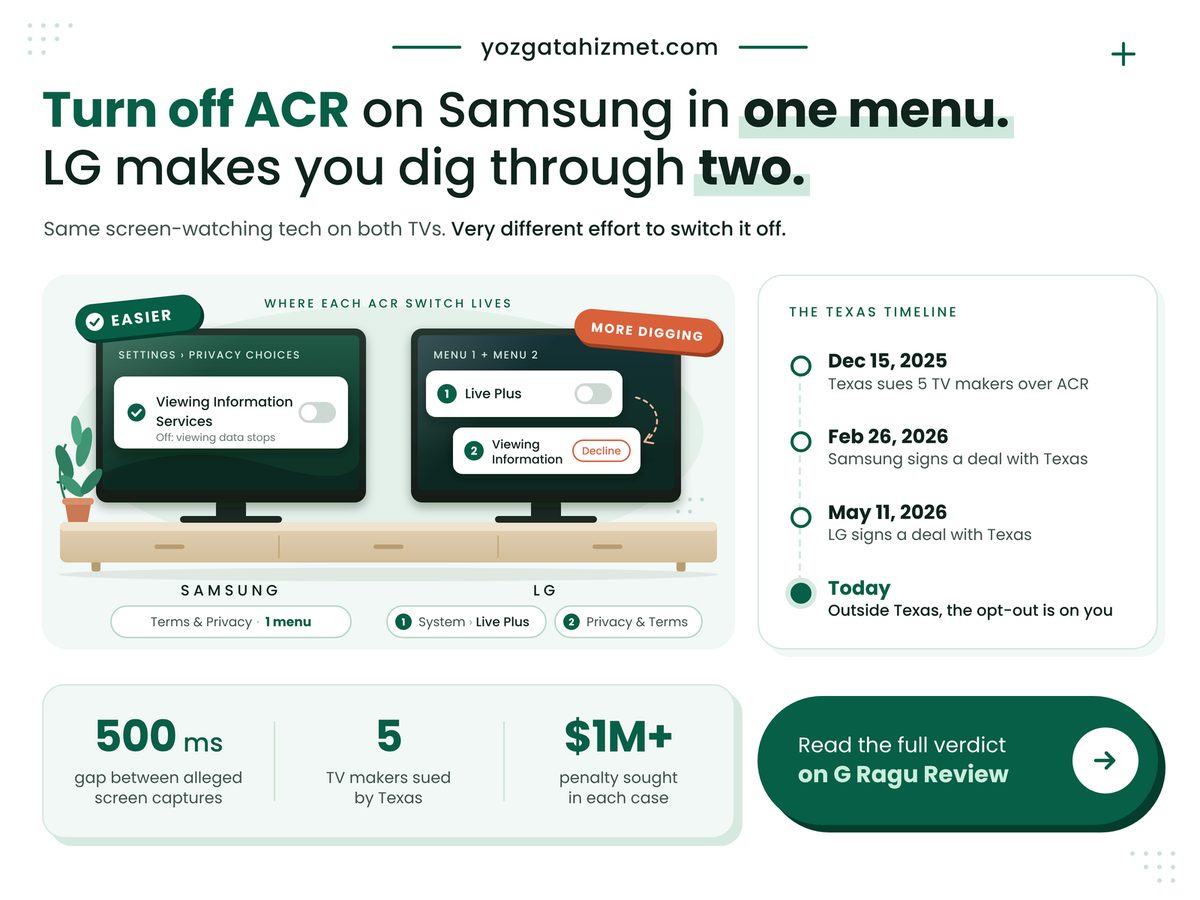
Samsung or LG: if you want to turn off ACR, the set that keeps it behind a single switch is the Samsung, and that is the answer this piece defends. ACR, automatic content recognition, is the feature that identifies what is on your screen and reports it back. Both brands ship it. Both were sued over it in Texas. But on a Samsung you hunt for one setting, while LG spreads the same job across two different menus with two different names.

Turn off ACR guide: Samsung needs one menu, LG needs two, with Texas timeline

Key Takeaways

Samsung is the easier opt-out: one setting, Viewing Information Services, stops its ACR, while LG spreads the same job across two menus.

  • On an LG, switch off Live Plus and decline the Viewing Information agreement under User Agreements; the two sit in different places.
  • Texas's lawsuits allege ACR also reads what plays through HDMI, so a console or cable box does not shield you.
  • Both makers' 2026 Texas agreements require consent from Texans; as announced, neither covers buyers in other states.

Is my smart TV taking screenshots of what I watch?

Yes, if ACR is switched on, according to the Texas Attorney General, whose December 15, 2025 release says the software can capture screenshots of a user's television display every 500 milliseconds. That is two frames a second. Do the sum: multiply the hourly figure in the grid below by the hours your TV is on tonight. A three-hour evening comes to 21,600 possible captures.

The old advice to use the TV as a dumb screen for a console is out of date. CyberInsider's December 19, 2025 summary of the complaints says the makers also collected data from HDMI-connected devices, game consoles and cable boxes among them. Never opening the built-in apps protects nothing. Our explainer on how smart TVs track what you watch with ACR covers the matching, and that profile feeds the advertising in your new smart TV sells ads before you watch anything.

Four numbers frame the legal side, and none lets either brand off the hook. The Attorney General's December release named Sony, Samsung, LG, Hisense and TCL. CyberInsider reported that the state seeks civil penalties in each case under the Texas Deceptive Trade Practices Act. Hoodline reported on January 7, 2026 that a Collin County order barring Samsung from using Texans' ACR data was vacated almost at once. The hourly count is our own arithmetic, not a filing's.

TV Makers Texas Sued

5

Samsung and LG both named

Penalty Sought per Case

$1M+

At stake for every brand

Life of Samsung's Court Order

1 day

No ruling shields your TV

Snapshots per Hour, Alleged

7,200

Derived; multiply by your nightly hours

The court order is the part people misremember. It was set aside, and a fresh application was denied on January 9. What changed Samsung's practice was an agreement, announced on February 26, 2026, requiring Texas consumers' express consent before any ACR collection.

"

A court order that lasted a day is not a privacy setting. The switch in your own menu is the only protection that stays on.

How do I turn off ACR on a Samsung or LG TV?

On a Samsung, open Settings, then Support, Terms & Privacy and Privacy Choices, and switch off Viewing Information Services; on an LG, switch off Live Plus and decline the viewing agreement under User Agreements. The paths come from Malwarebytes' March 2, 2026 guide and Tom's Guide's January 30, 2026 walkthrough, which warn that names shift by model year. Samsung's own support page says only that ACR can be switched off in Settings at any time.

LG's second stop is official. Its support library, in a page dated September 2026, sends owners to Settings, Privacy & Terms, User Agreements, where optional agreements cover what you watch, voice features and personalised ads. Live Plus sits elsewhere, under Additional Settings. So that is two switches. Well, one switch and one agreement, which look nothing alike. LG's updated terms took effect on August 28, 2026; if your set asked you to accept something since, that screen was the consent.

Read the table by row; each answers a question you would ask with the remote in hand.

What differs Samsung vs LG What it means for you
๐Ÿ’ฐ Effort Samsung 1 switch, 1 menu
LG 2 switches, 2 menus
✅ Half the hunt
๐Ÿ”’ Setting name Samsung Viewing Information Services
LG Live Plus, Viewing Information
⚠️ Search both names
⚖️ Texas deal Samsung Feb 26, 2026
LG May 11, 2026
✅ Texans get consent screens
๐Ÿงพ New terms Samsung After updates
LG Since Aug 28, 2026
⚠️ Reread new prompts
๐ŸŒ Outside Texas Samsung Not stated
LG Not stated
❌ Opt out yourself
๐Ÿ Best suited for Samsung One stop
LG Two-menu patience
๐Ÿ Patience decides

If you read one row, read the fifth: a buyer in Ohio or California should assume nothing changed. Whether the Texas consent screens quietly spread nationwide is the open question. Our guess is that a maker would rather ship one firmware than fifty, but a guess is not a setting.

Dec 15, 2025 Feb 26, 2026 May 11, 2026 Aug 28, 2026 73 days 74 days 109 days Texas files ACR suits Samsung agreement LG agreement LG's new terms live

Both brands now owe Texans a consent screen, yet neither agreement, as announced, says it reaches a TV anywhere else, so outside Texas the switch is still yours to flip. Dates come from the Texas Attorney General's releases and LG's support page; the day counts between them are our own arithmetic.

Where both opt-outs still fall short

Both opt-outs still depend on you finding a setting whose name and location change between model years, and neither Texas agreement, as announced, protects a buyer in another state. The settlements make LG's split menu harder to excuse. The Attorney General's May 11, 2026 release says LG must give users a clear and simple way to opt out. Two menus under two names is not simple.

Samsung is not spotless either: older menus differ from recent sets. And ACR is only one way a TV profiles you; the home screen is itself an ad slot, which is why we compared which home screen shows you fewer ads, Roku or Google TV.

  • Switching ACR off does not remove home-screen ads; it changes what they can be based on.
  • LG's support page says its terms-update notice cannot be disabled and stops only once you respond, so answer it deliberately.
  • Clicking agree at setup is the consent the makers rely on, and you can withdraw it in Settings whenever you like.

Check these against your own set

  • You can find Live Plus anywhere in Settings: do both LG stops, not one.
  • Anything plugs into an HDMI port: switch ACR off even if you never open an app.
  • Your address is outside Texas: no announced agreement changes your defaults.
  • You accepted new terms since late August: reopen User Agreements and read what you ticked.

Samsung is the easier opt-out: one setting, one menu, done. LG can be just as quiet, but only if you make both stops every time it asks you to agree to something new. This week, before your next evening of television, open Settings and switch the viewing-data setting off.

Wednesday, October 14, 2026

Wi-Fi 7 Router vs Mesh: One Box or Three?

Published
Author
Comments
0

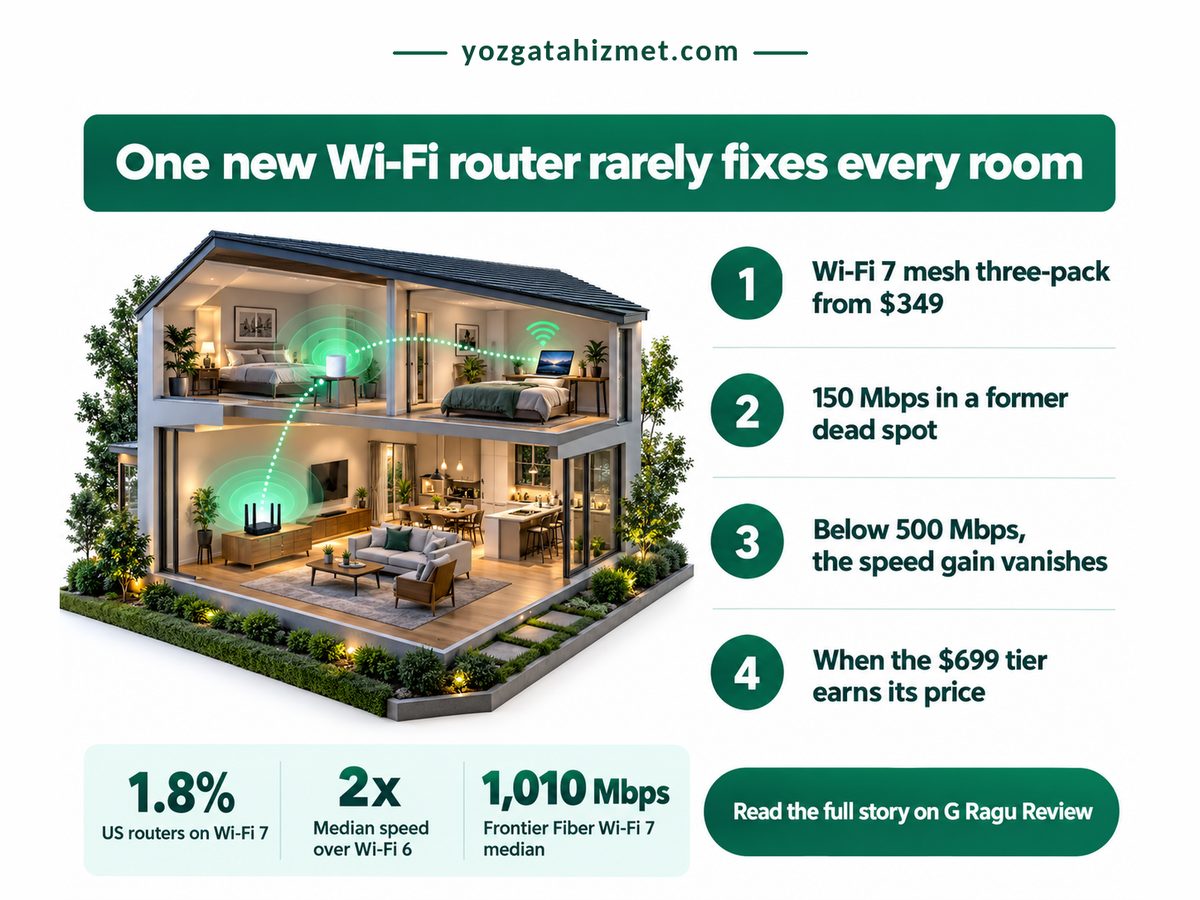
The video call freezes in the back bedroom again, and the store offers two fixes. One is a single flagship Wi-Fi 7 router. The other is a mesh kit: two or three smaller units that pass the signal from room to room. The Wi-Fi 7 router vs mesh choice looks like a speed question. It isn't. It's a walls question, and in most two-floor homes the mesh wins.

Wi-Fi 7 router vs mesh infographic: two-storey house cutaway, mesh prices and speed stats

Key Takeaways

In a home with two floors, or a room two walls from the router, a dual-band Wi-Fi 7 mesh beats one flagship router.

  • A faster router only shows its speed on plans above about 500 Mbps; mesh fixes coverage on any plan.
  • Each extra eero 7 node costs less than the first one did.
  • A single router still wins in a small flat where every room is one wall away.
  • Pay for 6 GHz mesh only with multi-gig fiber and Wi-Fi 7 phones or laptops.

Wi-Fi 7 router vs mesh: walls matter more than speed

A single Wi-Fi 7 router is fastest in the room it sits in, while a mesh spreads usable speed across every room, so the number of walls between you and the box matters more than its rated speed.

Start with what Wi-Fi 7 delivers. Ookla's US Speedtest data, reported by PCMag in June 2025, puts Wi-Fi 7 median downloads at 600 to 800 Mbps, roughly double Wi-Fi 6. That gain needs a plan to feed it: on 300 Mbps, the router was never the bottleneck. The provider matters more. Frontier Fiber customers on Wi-Fi 7 posted a 1,010 Mbps median and Verizon's 532 Mbps, so check the speed on your bill first.

PCMag's lab clocked Wi-Fi 7 routers near 2 Gbps, depending on how close you sit. That's a same-room number, and the room you're buying for is the far one, behind a stairwell, where a single box fades fast. Home 6 GHz gear also runs at low power while a higher-power mode waits on regulators, so that band stays short-range. Our comparison of Starlink plans against fibre and AirFiber shows how plan speed caps everything downstream, and the high-refresh TVs built for sports watching need that signal in the den.

Four numbers frame the purchase: TechRadar's March 2025 eero 7 pricing, the same PCMag report's Wi-Fi 5 comparison, Ookla's EE latency study (ISPreview, February 2025) and the WBA and ABI Research shipment count (FutureFive, January 2026). They cover cost, gain, feel and timing.

Mesh Three-Pack Price

$349.99

Three rooms covered, not one

Wi-Fi 7 vs Wi-Fi 5 Speed

4x

Biggest jump from old kit

Wi-Fi 7 Latency (EE, UK)

17 ms

Snappier calls and games

Wi-Fi 7 Access Points, 2025

66.5M

Mainstream now, not early-adopter

The shipment count changes the advice. The same outlook forecasts 117.9 million Wi-Fi 7 access points for 2026, nearly doubling again. A discounted Wi-Fi 6E mesh is still fair, since Ookla found 6E medians not far behind, but it's a bet on the generation the market is leaving. My view, and it is only a view: the saving has to be large.

"

Three mesh nodes cost about twice one router, not three times. In a house with walls, that ratio is the whole argument.

The question narrows. Not which box is faster, but which puts usable signal where you sit.

Is a mesh system better than a single router for dead zones?

Yes for most homes: a mesh system beats a single router for dead zones whenever the problem room sits two or more walls or a floor away, because each node relays a strong signal instead of shouting through plaster.

The evidence is unglamorous. In TechRadar's test, the dual-band eero 7 held about 150 Mbps in a room that had been a dead spot for the old router, matching its speed beside the main unit, with no 6 GHz radio at all. Coverage, not peak speed, fixed the back room.

Dimension Router vs Mesh What it means for you
๐Ÿ’ฐ Entry price Router eero 7, $169.99
Mesh eero 7 2-pack, $279.99
✅ The second node costs less than the first
๐Ÿ’ฐ Per-node cost Router one node at full price
Mesh 3-pack, about $117 each
✅ Every extra room gets cheaper to reach
๐ŸŒ Coverage Router about 2,000 sq ft
Mesh about 6,000 sq ft, 3-pack
✅ Reaches a second floor or a garage
⏱ Far-room speed Router fades past one or two walls
Mesh same as beside the router
✅ Fixes the room you actually use
๐Ÿ”‹ 6 GHz band Router standard on flagships
Mesh absent on eero 7
⚠️ Matters only to Wi-Fi 7 devices
⏱ Plan threshold Router pays off above 500 Mbps
Mesh coverage gain on any plan
⚠️ Check your bill before buying
๐Ÿ Best suited for Router small flat, one wall away
Mesh two floors or thick walls
๐Ÿ Count the walls, not the megabits

Mesh wins on price too. By our arithmetic from eero's list prices, the second node adds $110 and the third only $70, so three rooms cost about twice one. A single router still leaves the far room on one weak signal (the stairwell is usually the culprit).

Routers in US homes by Wi-Fi generation. Wi-Fi 6 · 44.2%. Wi-Fi 5 · 33%. Other or older · 21%. Wi-Fi 7 · 1.8%.

Nearly every buyer is upgrading from Wi-Fi 5 or Wi-Fi 6, so even a Wi-Fi 7 mesh without 6 GHz is a real step up. Shares are Ookla Speedtest US router data via PCMag, June 2025; the other slice is our derived remainder.

Do you need 6 GHz in a Wi-Fi 7 mesh system?

Only if your plan runs past a gigabit and your phones and laptops support Wi-Fi 7; otherwise a dual-band mesh without 6 GHz delivers the coverage you need for a fraction of the price.

The step up is steep. TechRadar lists the tri-band eero Pro 7 three-pack at $699.99 and the Max 7 three-pack at $1,699.99, two to five times the dual-band kit. That buys 6 GHz lanes, which earn their price only when multi-gig fiber feeds Wi-Fi 7 laptops and phones. Otherwise it's a motorway with no cars.

Is Wi-Fi 7 worth it if your devices don't support it? Partly. Older gadgets join at their own speed but still gain from a strong node in their room, so mesh improves the gear you already own. The smart TV gets a stronger signal too, a good moment to switch off the ACR tracking that reports what you watch.

  • Speed studies flatter the router: ISPs pair their best kit with their fastest plans, as Ookla's EE analysis admits.
  • Place nodes halfway to the dead room, not inside it.
  • Got Ethernet between rooms? Wire the nodes together to free their radios.

Before you buy, check which of these is true for you

  • The problem room is two walls or a floor from the router.
  • A test beside your router already matches your plan speed.
  • Your phone or laptop lists 802.11be (Wi-Fi 7).
  • Your plan is multi-gig fiber.

So, one box or three? In a small flat where every room is one wall from the socket, buy the router. Everywhere else, buy the dual-band Wi-Fi 7 mesh; a flagship router is the expensive way to keep a dead zone. This week, run a speed test beside your router and one in your worst room: if the second is under half the first, order the mesh.

Wednesday, October 7, 2026

iCloud vs Google One: What $9.99 Buys You

Published
Author
Comments
0

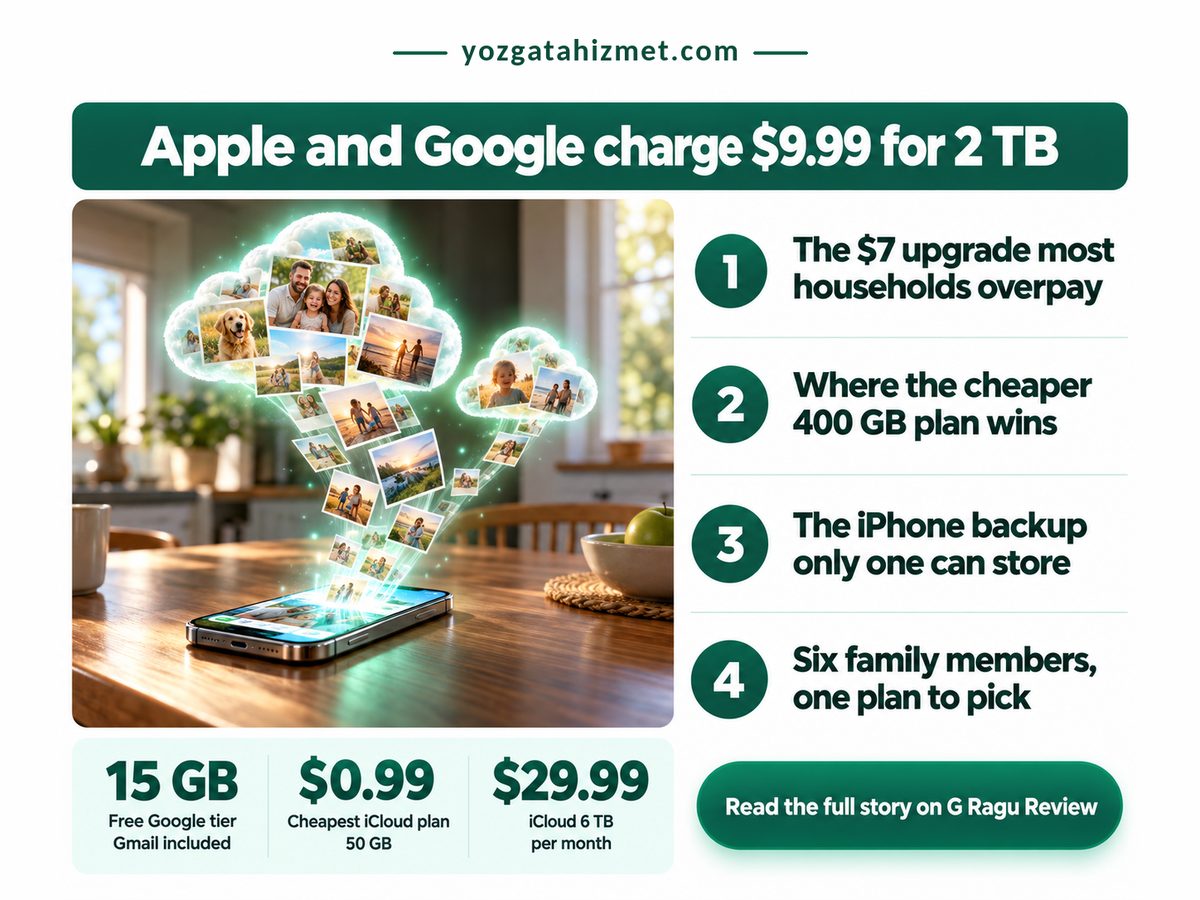
Your iPhone has told you, again, that its storage is full. Two subscriptions are waiting to fix it: Apple's iCloud+ and Google One. At 2 TB they cost exactly the same, $9.99 a month in the US, going by Apple's own price list and 9to5Google's June 2026 report on Google's plans. So iCloud vs Google One is not a price fight at the size most families buy. It is about what each plan can save, and for any home with an iPhone, the answer is Apple.

iCloud vs Google One infographic: smartphone, family photos and two clouds of storage

Pay Apple if anyone in your home uses an iPhone. Pay Google only if nobody does, or if your whole Google account fits inside its cheaper mid tier.

  • At 2 TB the monthly bill is identical, so cost cannot settle this choice.
  • Only iCloud can hold a full iPhone backup that rebuilds the whole phone.
  • Google's mid tier gives twice Apple's space for a couple of dollars more.
  • Both plans stretch to a whole family, so sharing is a draw.

Why does the iCloud vs Google One choice hinge on backup, not price?

It hinges on backup because the two companies charge the same at 2 TB, while only Apple's service can store a complete iPhone backup that rebuilds a lost or replaced phone exactly as it was before.

Apple's support page, updated September 16, 2026, lists 200 GB of iCloud+ at $2.99 a month, and the next step up is the 2 TB plan. That jump costs an extra $7 a month, so a 250 GB photo library pays for room it will never fill. Apple sells nothing in between, or nothing on its own, anyway.

Google moved the other way this summer. 9to5Google reported on June 8, 2026 that Google AI Plus dropped to $4.99 a month and now carries 400 GB. For about $2 more than Apple's 200 GB tier, a Google customer gets double the space. Here Google is plainly the better buy, and it is a good reason to audit every plan you pay for, the habit behind why free ad-supported streaming is quietly beating the subscriptions you stack up.

The usual advice says pick whichever company already holds your email. For iPhone owners, we think that advice is out of date. Google now sells storage inside plans named after its AI features, and our Roku vs Google TV ads comparison shows how a Google bundle can change once you are inside it. Our read, and it is opinion rather than data: cheap Google storage is a promotion for AI, and promotions get repriced.

Four numbers, our own arithmetic on Apple's and Google's current prices, decide most households.

Time Since Google's Price Cut

4 months

Older plans: check your terms

Each Person's Share of 2 TB

$1.67 a month

Six people, one bill

Unused Space, 250 GB on 2 TB

1.75 TB

Paid for, never filled

Google Mid Tier, Space per $1

80 GB

Apple's mid tier gives 67 GB

The shared-plan figure is the one that should change how a family buys. Apple's support page says every iCloud+ plan can be shared with up to five other family members, and Internxt's August 2026 breakdown of Google One pricing describes the same limit for Google, pooled across its apps. Split one large plan and each person pays less than a coffee a month, so several small plans side by side usually means overpaying.

"

Move a 250 GB library onto 2 TB and most of what you pay for is empty shelf, every single month.

Price still matters at the edges. Apple's figures below come from its support page, Google's 100 GB and 5 TB AI Pro prices from PhoneArena's April 2026 report, and its free allowance from Google One's plans page.

Is Google One cheaper than iCloud?

Google One is cheaper at the top and in the middle, Apple is cheaper to start, and at 2 TB the two cost the same, so price only decides the choice for households at either end of the scale.

Dimension Apple vs Google What it means for you
๐Ÿ’ฐ Entry price Apple 50 GB, $0.99
Google 100 GB, $1.99
✅ Apple is the cheapest way to start
๐Ÿ”‹ Biggest plan Apple 6 TB, $29.99
Google 5 TB, $19.99
✅ Google saves about $1 per terabyte
๐Ÿ“Š Free space Apple 5 GB
Google 15 GB, Gmail included
⚠️ A busy inbox eats Google's allowance first
๐Ÿ›  Phone backup Apple whole iPhone, restorable
Google photos and files only
❌ Google cannot rebuild a lost iPhone
๐ŸŒ Devices Apple Apple gear and web
Google Android, iPhone, web
⚠️ Mixed-phone homes get more from Google
๐Ÿงพ Plan terms Apple storage plan only
Google storage tied to AI plans
⚠️ Google's price can move with its AI offer
๐Ÿ Best suited for Apple any home with an iPhone
Google no iPhones, under 400 GB
๐Ÿ Count the iPhones first, then the gigabytes

For an iPhone owner the backup row outweighs every price row, because no storage saving covers a phone you cannot restore. Google's wins are real but narrow.

Starter tier. Apple 50 GB. $11.88 a year. Google 100 GB. $23.88 a year. Mid tier. Apple 200 GB. $35.88 a year. Google 400 GB. $59.88 a year. 2 TB tier. Apple 2 TB. $119.88 a year. Google 2 TB. $119.88 a year. Top tier. Apple 6 TB. $359.88 a year. Google 5 TB. $239.88 a year.

Over a year, Apple and Google only part ways at the smallest and largest plans, so a household storing up to 2 TB should choose on backup, not the bill. Yearly totals are our arithmetic: each monthly US price cited above, times twelve.

Where Google One breaks for an iPhone household

Google One breaks the moment an iPhone needs restoring, because Google can keep that phone's photos and files but cannot store the full device backup that puts apps, settings and messages back on a new handset.

An iPhone backs itself up to iCloud or a computer, nowhere else. Pay only Google and your pictures survive a dropped phone, but you set the new one up from scratch.

Platforms also change rules after you commit, as Amazon did when its Vega OS ended sideloading on new Fire TV Sticks. If you signed up for AI Plus before June, 9to5Google's report puts the old deal at $7.99 for 200 GB, so check which terms your account is actually on.

  • Gmail attachments count against the same Google allowance as your photos.
  • Google One family sharing needs every member on a Google account, not an Apple one.

Key Takeaways to act on

  • Someone at home would need to restore an iPhone tomorrow: choose iCloud+.
  • Nobody uses an iPhone and your Google account sits under 400 GB: choose Google AI Plus.
  • You joined Google AI Plus before June: open your plan page and confirm the new terms.
  • You need more than 2 TB: price Google's 5 TB plan before Apple's 6 TB one.

Count the phones and the decision is made. If an iPhone lives in your house, pay Apple and pick the smallest tier you will fill; if none does, Google gives more space for less. This week, open Settings, tap your name, then iCloud, and check what you really use before buying more.

Sunday, October 4, 2026

Roku vs Google TV Ads: Which Shows You Fewer

Published
Author
Comments
0

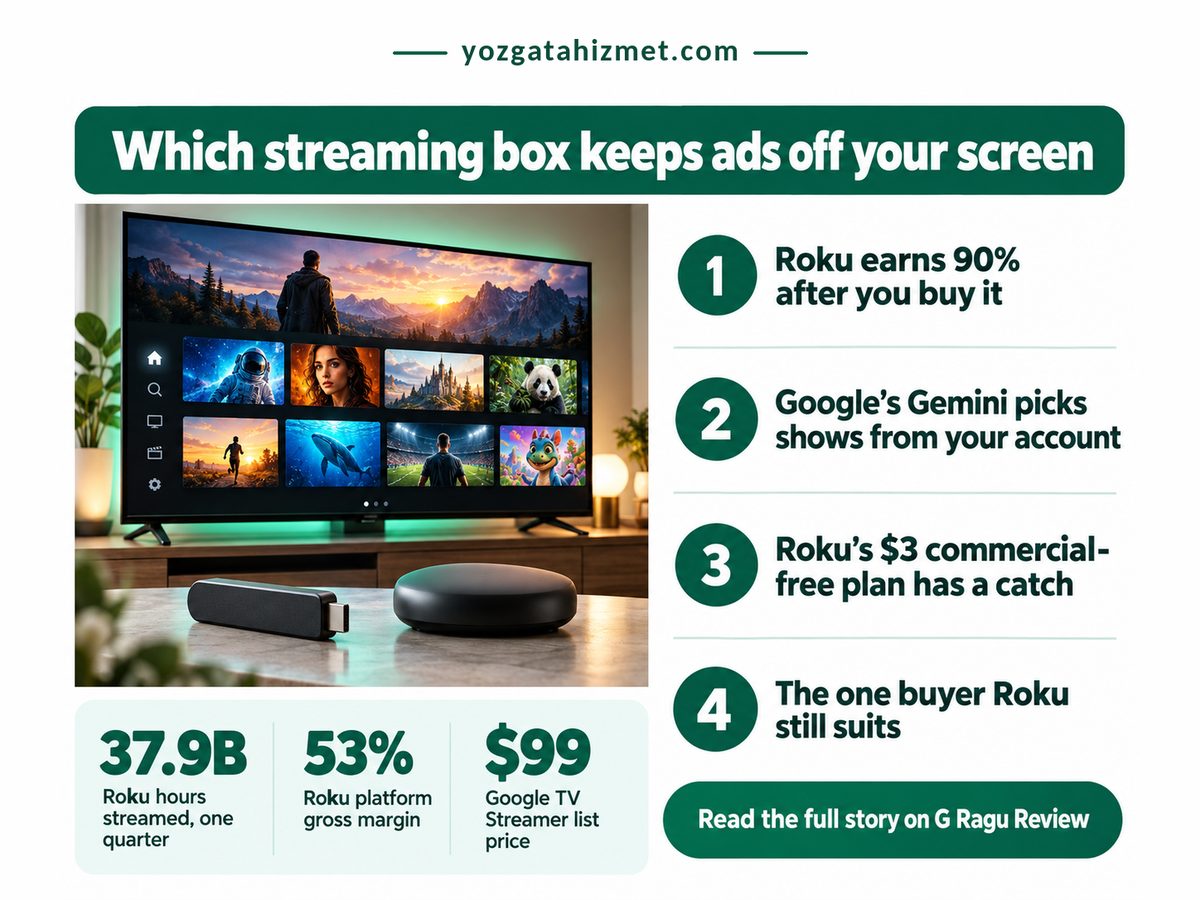
You plug in a new streaming box, press Home, and the screen is selling you something before a single app opens. It happens on Roku and on Google TV, but not to the same degree, and that gap is the point of a Roku vs Google TV ads comparison. The answer first: Google TV, set up the right way, shows you fewer ads. Roku shows you more, and Roku's own accounts explain why that will not change.

Roku vs Google TV ads poster: crowded TV home screen above two streaming devices

Key Takeaways

Google TV shows fewer home-screen ads than Roku, but only after you switch on Apps only mode, and that switch has a price.

  • Roku earns most of its money after the sale, so its home screen is built for ads.
  • Apps only mode hides Google's suggestion rows but keeps sponsored content and turns off Search.
  • A 4K Roku stick costs half a Streamer on sale; you repay it in attention.
  • Hate ads: buy the Streamer. Want the lowest price: buy the Roku.

Why does Roku put more ads on your screen?

Roku puts more ads on your screen because its business runs on what happens after the sale: the platform side, which sells advertising and distribution deals, earns far more, and at a far fatter margin, than the hardware does.

Roku's second-quarter 2026 results, filed with the SEC on August 6, 2026 (Roku 8-K, Exhibit 99.1), spell it out. Three numbers from that filing, plus the Streamer's list price as reported by Chrome Unboxed in June 2026, show who really pays for the box.

Hours streamed on Roku, Q2

37.9 billion

Your evenings, sold to advertisers

Google TV Streamer list price

$99

What a quieter screen costs

Roku platform revenue, one quarter

$1.22 billion

Up 25%, so more placements

Roku platform gross margin

53%

Ads outearn the box

The margin is the number to sit with. A company keeping roughly half of every platform dollar as gross profit, and much less on hardware, has no reason to sell you a quiet home screen. An ad-free Roku tier would cut against the most profitable thing it does.

"

On a Roku, the box is the cheap part. The home screen is the product, and your evening is what gets sold on it.

Plenty of smart TVs sell ad space before you watch anything, so Roku is not unusual. What separates these two is what you may switch off. Tracking is a separate fight, covered in our guide to ACR tracking settings on Roku and other TVs.

Roku vs Google TV ads: the side-by-side

Side by side, Google TV gives you one real switch that clears most of its home-screen suggestions, while Roku offers only a wallpaper toggle, so the trade is a higher box price against a noticeably quieter screen.

Prices are Roku's April 2025 launch price, reported by Tom's Guide, and Chrome Unboxed's June 2026 Streamer sale price. Margin and Howdy rows come from Roku's filing; the per-hour row is our own arithmetic.

Dimension Roku vs Google TV What it means for you
๐Ÿ’ฐ Box price Roku $39.99 Stick Plus, 4K
Google TV $79.99 Streamer on sale
✅ Roku leaves $40 in your pocket today
๐Ÿ”‹ Box margin Roku 20.1% on devices
Google TV Not broken out
⚠️ Roku recovers the box through ads
๐Ÿ“Š Cash per hour Roku About 3.2 cents, our math
Google TV Not disclosed
⚠️ Heavy viewers fund Roku the most
๐Ÿ”’ Ad-off switch Roku Sponsored wallpapers only
Google TV Apps only mode, one toggle
✅ Google hides its suggestion rows
⚖️ What stays on Roku Home-screen banner ads
Google TV Sponsored content
⚠️ Neither screen goes fully quiet
๐Ÿ›  What you lose Roku Nothing, little changes
Google TV Search and the Assistant
❌ Voice search stops working on Google
๐Ÿงพ Ad-free shows Roku Howdy, $3 a month, one app
Google TV Your own paid apps
❌ The menu keeps its ads either way
๐Ÿ Best suited for Roku Second TV, tight budget
Google TV Main TV, low ad tolerance
๐Ÿ Ads bother you: pick Google TV

That per-hour row is platform revenue divided by hours streamed. It includes distribution deals, so treat it as a ceiling, not an ad price. Still, a household streaming three hours a night is worth about $35 a year to Roku's platform, close to the stick's own price. The box pays for itself within a year, just not for you.

90%. after the sale. Platform: ads, deals · 90%. Devices: the box · 10%.

Nine in every ten dollars Roku takes in arrive after you have bought the box, so any Roku you buy is built to keep showing you ads. Derived from Roku's Q2 2026 8-K, which put device revenue at $133.7 million against the platform figure in the grid above.

Where each platform's ad promise breaks

Each platform's promise breaks somewhere specific: Google TV's quiet mode switches off features many people use daily, and Roku's ad-free offer covers one app while leaving the home screen exactly as busy as before.

Does Google TV have ads on the home screen?

Yes, and Apps only mode reduces them rather than removing them. Google's support page, retrieved October 4, 2026, says the mode hides personalised recommendations but still shows sponsored content, and turns off Search and the Google Assistant. Chrome Unboxed reported in June 2026 that Gemini for TV completely replaces the Assistant, so I would expect voice features to go dark too. That is my reading, not Google's wording.

Leave the mode off and Gemini's picks lean on your Google account. Fewer banners, more personalisation: that is the honest trade.

Can you turn off ads on the Roku home screen?

Only at the edges. You can turn off sponsored wallpapers, and the home-screen banner stays. Howdy, which Roku's filing calls a premium, ad-free service, removes ads inside Howdy and nowhere else. Or rather, from what you watch there, not from the menu you pass through to reach it. Free ad-supported streaming channels work the same way: you pay in attention.

  • Apps only mode sits under Settings, Accounts & Sign In, your profile, and must be set per profile.
  • Roku's toggle is Settings, Theme, Sponsored wallpapers, and changes nothing else.
  • Platforms change under you, as Vega OS on new Fire TV Sticks showed, so judge a box on today's settings.

Check these about your own home before you buy

  • You use voice search most evenings: Apps only mode will annoy you.
  • The TV is a spare you use a few hours a week: the ad gap barely touches you.
  • You open the same two paid apps every night: Apps only mode costs you almost nothing.
  • The extra $40 would stretch your budget this month: buy the Roku and stop reading.

So, the decision. If home-screen ads are what you want gone, buy the Google TV Streamer on sale and switch on Apps only mode the first evening. If you want the cheapest 4K box for a second TV and can live with a banner, Roku still suits you. This week, if you own any Google TV device, turn on Apps only mode for seven days; if you have not missed voice search by Sunday, you have your answer.

Related: whether a TV antenna vs YouTube TV is the cheaper way to get local channels

Tuesday, September 15, 2026

Starlink India Plans vs Fibre: The Real Cost

Published
Author
Comments
0

The fibre guy has been saying next month for two years. Your phone shows four bars of 5G on the terrace and nothing in the back bedroom. So you start reading about Starlink India plans, and somewhere around the third forum thread it becomes clear that nobody is comparing the thing that decides it, which is what a full year costs against a wire you cannot actually get.

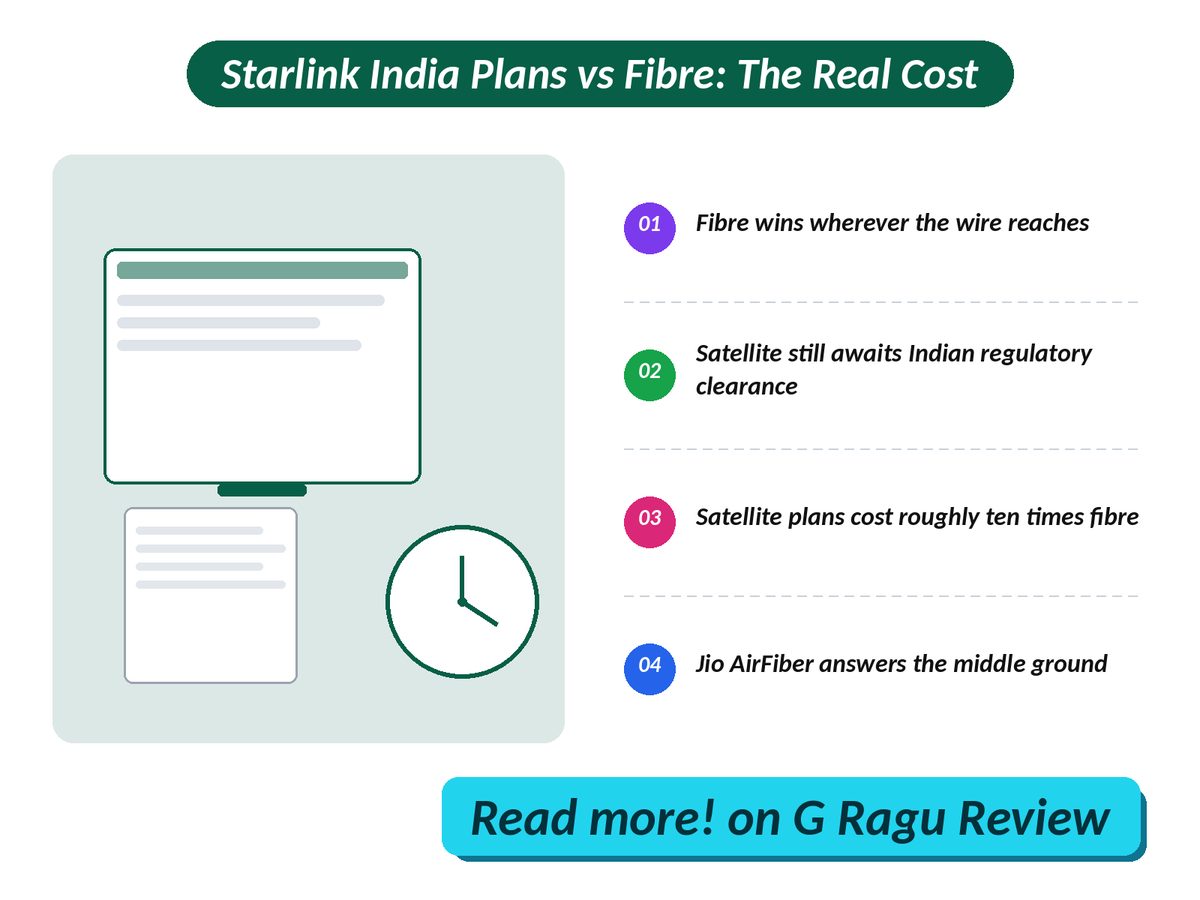
Cost comparison of Starlink India plans against Airtel fibre and Jio AirFiber

TL;DR: Fibre wins wherever it reaches, fixed wireless wins the middle, and satellite is for the addresses neither one ever got to.

  • Satellite is not commercially open in India yet. Clearances still sit ahead of it.
  • The listed satellite price is roughly ten times a comparable wired plan, before any hardware is counted.
  • Jio AirFiber, not fibre, is the realistic answer for most homes the wire skipped.
  • Buy the dish only when no provider will commit to a date and indoor 5G fails a call.

Is Starlink Available In India Yet?

Not commercially, no: Starlink holds an Indian licence and has ground stations planned, but the satcom spectrum framework only cleared the Digital Communications Commission in September 2026, with Cabinet approval and security clearances still ahead of it.

That approval, reported by The Hans India on 9 September 2026, settled how satellite operators will be charged and left the calendar blank. Cabinet sign-off comes next, then security demonstrations, and Starlink, Amazon's Kuiper and Jio's own satellite arm are queued behind the same gate. The framework also dropped the separate per-subscriber urban levy the regulator had proposed, on the practical ground that nobody could reliably tell an urban subscriber from a rural one. Meanwhile the thing you are buying bandwidth for keeps getting hungrier, and a surprising share of it is what your smart TV quietly reports back over that connection.

Here is the number that explains why anyone cares. TRAI's June 2026 subscriber report counts 5.15 million rural wireline connections against 42.68 million urban ones. The wire went to the cities and largely stopped there. That gap is the real addressable market for satellite broadband in India, and it is not a rounding error. What it is not is a market for satellite at the price that briefly appeared last December.

Wired broadband lines

47.71 million

TRAI count, June 2026

Speed ceiling floated

200 Mbps

Ministry position, July 2025

Trial window offered

30 days

Starlink listing, December 2025

Satcom spectrum levy

5% of revenue

4% when serving rural areas

Set the national wireline count beside the billion-plus broadband connections India actually carries and the shape of the problem stops being subtle. Fewer than one connection in twenty in this country is a wire. Everything else is a radio. That is why a dish on the roof reads as exotic here while a 5G box on the windowsill does not, and it is why the honest comparison for satellite was never fibre in the first place. Most households are buying a pipe for video anyway, increasingly for the free ad-supported apps that now out-watch paid subscriptions, and those need steadiness far more than they need a headline speed.

"

Satellite broadband in India is not competing with fibre. It is competing with having nothing at all, and against nothing it wins without trying.

What Starlink India Plans Cost Against Fibre

About an order of magnitude more per month before any hardware is counted, and that gap holds across every tier because the satellite price barely moves with speed while wired and fixed-wireless plans get cheaper per megabit as you climb.

One caveat before the table, and it matters. Starlink showed Indian residential pricing on its own site in December 2025, then called the figure a technical glitch within hours, after the Economic Times had reported a far lower band of Rs 2,500 to Rs 3,500. Business Standard covered both versions on 10 December 2025. So the satellite column is a listing, not a tariff. My own read is that it will not survive contact with a market where the alternatives are this cheap, and the grey area is how far it falls: a price that clears in Ladakh is a different number from one that clears in Lucknow, and the company has said nothing useful about which it is aiming at. Treat the column as a ceiling.

DimensionStarlinkAirtel Xstream FiberJio AirFiber
Monthly Rs 8,600 as listed Rs 799 at 100 Mbps Rs 899 at 100 Mbps
Up front Rs 34,000 kit, not refundable Free install, router included Rs 1,500 to Rs 2,500, refundable
Data Unlimited on the listed plan Unlimited, no stated cap 1 TB, then 64 Kbps
Speed 190 to 360 Mbps in nearby markets 40 Mbps to 1 Gbps tiers 30 Mbps to 1 Gbps tiers
Reach Ground stations planned in 6 cities Only where the lane is already cabled 5,800 plus towns
Today Not selling, clearances pending Selling now Selling now
Payback Kit alone equals 42 months of fibre Baseline for the comparison Kit equals 38 months of AirFiber
Best suited for Addresses with no wire and no usable 5G Any street the cable already reaches Towns with 5G but no fibre

Two rows carry the argument. The payback row is arithmetic anyone can redo: divide the kit by the monthly fibre bill and the box alone costs three and a half years of service before a single byte moves. The reach row is the counterweight, and it is the only one that can overturn the verdict, because a plan you cannot order is worth nothing however cheap it is.

First year, hardware included. Airtel fibre. Rs 9,588. Jio AirFiber. Rs 10,788. Starlink. Rs 1,37,200. Bars drawn to scale. Twelve months plus one-time hardware.

Derived here from the monthly prices in the table above, Airtel's published plan page and Starlink's listed Indian pricing. Operator figures are quoted before GST where the operator lists them that way, and the refundable AirFiber deposit is excluded.

Is Satellite Internet Worth It If Fibre Reaches You?

No, not if a wire already terminates at your building, because satellite costs more, delivers less headroom and adds a failure mode you cannot fix from inside the house, leaving redundancy as the only honest case.

Capacity is the part that never appears on a comparison page. A single constellation might support only 10,000 to 20,000 connections in a city the size of Delhi, because the beams are shared and the sky over a metro is the same sky for everyone underneath it. September's framework dropped the explicit subscriber caps that had been floated earlier, which sounds like good news for buyers in cities. It is not, or it stops being good news the moment you notice that dropping a rule does not add a single beam overhead. Satellite in dense areas gets rationed by queue and by price whether or not a regulation says so, and the places that need it least are the places that will bid hardest for it.

Then there is what the connection feels like rather than what it measures. Satellite adds a round trip to orbit on every request, which barely shows in a speed test and shows immediately in a video call, a game, or a live stream that keeps rebuffering at the worst possible second. Anyone who has argued about why 60 FPS matters more than 4K for a live match already knows the principle: delivery consistency beats peak numbers, every time. Rain fade is the other one. A dish in a Kerala monsoon is not the same product as a dish in Leh, and no brochure will tell you that.

Four things to check before you put money down:

  • Ask your wired provider for a written installation date, not a verbal one, and ask twice across two months.
  • Test indoor 5G in the room you actually work in, at the hour you actually work, not on the terrace at noon.
  • Read the fair-usage line, because a 1 TB cap that drops you to 64 Kbps is a different product from genuinely unlimited.
  • Price the hardware as a sunk cost, since a refundable deposit and a purchased dish are not comparable commitments.

Buy the dish only when all three are true.

  • No wired provider will commit to a date at your address, and you have asked more than once.
  • Indoor 5G fails a video call in the room where the work happens, on a weekday, not a Sunday morning.
  • The connection earns its keep, or someone other than you is paying the first-year bill.

So do this before the end of the week: open your provider's app, request a written fibre or AirFiber feasibility check at your exact address, and put the reply in a folder. That single reply decides which column above you belong in, and it costs nothing. If the answer comes back no on both, you are the customer satellite was built for, and the wait is worth it. If it comes back yes, spend the money on the other end of the chain instead, starting with the panel spec that actually changes how live sport looks.

Related: choosing between a Wi-Fi 7 router vs mesh for whole-home coverage